
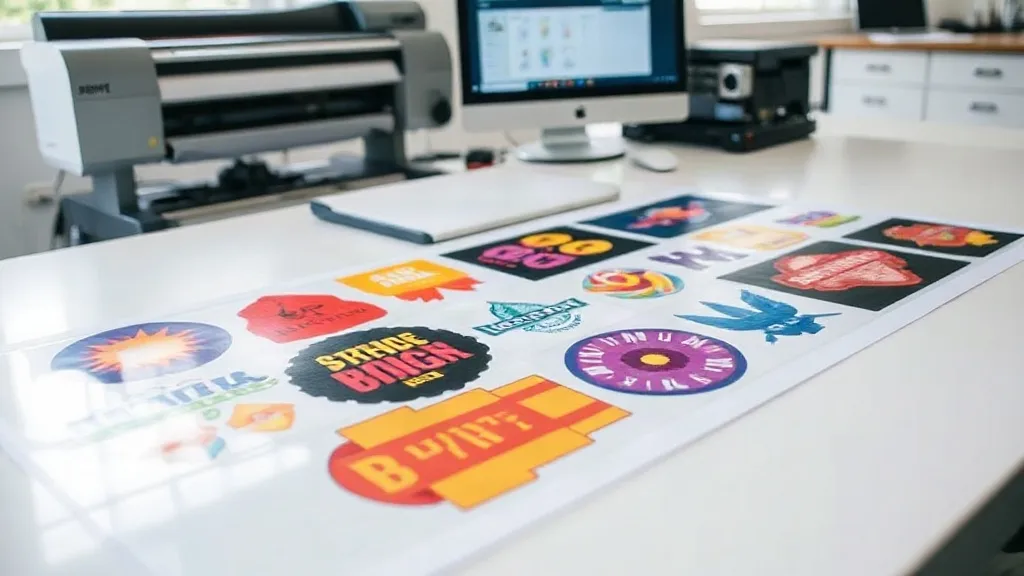
If you run a print-on-demand business or a small apparel brand, you know that efficiency is everything. Every minute saved and every cent cut from production costs directly impacts your bottom line. That's where the DTF Gangsheet comes into play. This innovative approach to DTF printing is changing the game for businesses of all sizes, allowing you to print multiple designs in one go, saving time, money, and materials.
What Exactly Is a DTF Gangsheet?
Before we dive into the benefits, let's clarify what a DTF Gangsheet is. In essence, it's a large sheet of DTF transfer film that contains multiple designs arranged efficiently. Instead of printing each design individually, you gang them up on a single sheet, hence the name. This method maximizes the use of the film and ink, reducing waste and cost per print.
Think of it as batch printing for DTF transfers. Whether you have a variety of small logos, intricate patterns, or a mix of sizes, a gangsheet allows you to consolidate your print jobs. This is particularly useful for businesses that handle many small orders or need to produce samples quickly.
Why Your Business Needs DTF Gangsheets
You might be wondering if gangsheets are worth the switch. Let's break down the key advantages that can transform your production process.
Cost Efficiency
One of the most immediate benefits is cost savings. DTF film and ink are significant expenses in the printing process. By using a gangsheet, you minimize wasted space on the film. Instead of printing one small design on a standard sheet, you fill the sheet with multiple designs, getting more out of each sheet. This directly reduces your cost per transfer, which can either boost your profit margins or allow you to offer more competitive pricing.
Time Savings
Time is money. Printing each design separately means multiple trips to the printer, more setup time, and more handling. With a gangsheet, you print everything at once. This streamlines your workflow, especially when you have a high volume of orders. You can produce more in less time, which means faster turnaround for your customers and the ability to take on more orders without expanding your team.
Consistency and Quality
When you print designs together on the same sheet, they go through the same printing conditions, ensuring consistent color and quality across all transfers. This is crucial if you're producing a set of items, like team jerseys or promotional merchandise, where uniformity matters. Plus, DTF prints are known for their vibrant colors and durability, and gangsheets maintain that quality.
How to Create a DTF Gangsheet That Works
Creating an effective gangsheet requires some planning. Here are practical steps to ensure you get the most out of your sheets.
1. Plan Your Layout
Before you start printing, arrange your designs on the sheet digitally. Use design software to maximize the use of space. Rotate and nest designs to fill gaps. Remember to leave a small margin between designs for easy cutting and to prevent ink bleeding. A well-planned layout can significantly increase the number of designs per sheet.
2. Group Similar Jobs
If you have multiple orders with similar deadlines, group them together on one gangsheet. This reduces the number of print runs. However, be mindful of color profiles: if designs require different color settings, it might be better to separate them to avoid compromising quality.
3. Use Quality Materials
Not all DTF films are created equal. Invest in high-quality film and ink to ensure your transfers are durable and vibrant. Cheap materials can lead to fading, cracking, or poor adhesion, which will cost you more in the long run. Also, make sure your printer is well-maintained and calibrated for DTF printing.
4. Test and Refine
Start with a small gangsheet to test your layout and settings. Check the output for color accuracy, detail, and ease of transfer. Adjust your layout or printer settings as needed. Over time, you'll develop a system that works best for your specific needs.
Common Mistakes to Avoid with DTF Gangsheets
Even experienced printers can make mistakes. Here are a few pitfalls to watch out for.
- Overcrowding: Trying to fit too many designs can lead to cutting errors and damaged transfers. Leave enough space for clean cuts.
- Ignoring grain direction: DTF film has a grain, and placing designs incorrectly can affect the feel and stretch of the final print. Always align designs with the grain.
- Inconsistent color profiles: Mixing designs with different color requirements on one sheet can result in inaccurate colors. Group similar color profiles together.
- Poor adhesion: Ensure the film is compatible with your printer and that you follow the correct transfer process. Test on a scrap piece first.
Real-World Applications
DTF gangsheets are versatile. Here are some ways businesses are using them today.
- Custom T-Shirt Shops: Print multiple shirt designs on one sheet, especially for small batches or sample packs.
- Sports Teams: Create numbered jerseys and logos for entire teams efficiently.
- Promotional Events: Produce a variety of logos and slogans for giveaways and merchandise.
- E-commerce Stores: Offer a wide range of designs without holding inventory, printing as orders come in.
Frequently Asked Questions
What is the maximum size for a DTF gangsheet?
The maximum size depends on your printer's capabilities. Common sizes range from 13 inches wide to 24 inches or more. Some industrial printers can handle even larger sheets. Always check your printer's specifications and ensure your film size matches.
Can I mix different fabric types on one gangsheet?
Yes, you can print designs for different fabrics on the same sheet. However, the transfer process (temperature, pressure, time) may vary depending on the fabric. It's best to group designs that will be applied to similar fabrics to streamline the pressing process.
How do I store DTF gangsheets before use?
Store them in a cool, dry place away from direct sunlight. Keep them flat to prevent curling. Avoid stacking heavy objects on top. Proper storage ensures the film remains stable and the ink doesn't degrade.
Are DTF gangsheets cost-effective for small orders?
Absolutely. Even for small orders, gangsheets reduce waste and allow you to combine multiple designs. If you have several small orders, grouping them on one sheet can significantly lower your cost per piece.
What software do you recommend for creating gangsheets?
Any vector graphics software like Adobe Illustrator or CorelDRAW works well. There are also specialized RIP software options that offer gangsheet layout tools. Choose one that integrates with your printer and allows precise control over spacing and nesting.
DTF gangsheets are a powerful tool for any business looking to optimize their custom apparel production. By implementing this strategy, you can reduce costs, save time, and deliver high-quality products to your customers. Start experimenting with gangsheets today and see the difference in your workflow.